Incident Analysis Walkthrough
This walkthrough demonstrates the core advantage of NeatContext: giving your AI a team's domain knowledge changes how it investigates an incident. You will analyze the same incident as two different teams — each in its own Context, connected to your AI client — and watch it correctly reach two different outcomes: one team hands the incident off, the other finds and fixes the root cause.
It uses the open NeatContext incident-analysis demo, which ships three tiny local mock systems (incident management, logs, deployments), a connector extension, two team profiles, and each team's runbooks. Everything runs on your machine; nothing touches real infrastructure.
Between the two investigations, the only things that change are the profile and the knowledge folder each Context carries. The incident, the tools, and the raw evidence are identical — yet each team arrives at its own correct action. That is the whole point.
The scenario
A single SEV2 fires: INC-1001 — elevated 5xx error rate on checkout-api.
There is one true root cause: at 08:58 the Infra Team cut the pgbouncer
default_pool_size from 100 → 40, which starved the billing-postgres
connection pool. checkout-api (owned by Payments) is a victim, not the cause —
its 5xx began at 09:02, before the Payments deploy at 09:05, and the
payment provider is healthy the whole time.
The right action, though, depends on which team is looking:
| Payments Engineering | Infra Team | |
|---|---|---|
| Owns | checkout-api, invoice-worker, webhooks | billing-postgres, pgbouncer, kafka, mesh |
| What it finds | 5xx predates our deploy; provider healthy; dominant error is DB-pool exhaustion we don't own | the 08:58 pgbouncer default_pool_size 100→40 change starved the pool |
| Correct outcome | Not our root cause → hand off to Infra with evidence | Root cause found → revert pool size + RELOAD, verify, monitor |
| Guardrail it enforces | don't touch pgbouncer/Postgres — escalate | don't fail over the Postgres primary during business hours |
Prerequisites
- Node.js 18+ — to run the mock systems (
node --version). - openssl — to generate the demo's self-signed TLS cert (ships with Git;
standard on macOS/Linux). Check with
openssl version. - NeatContext installed, and a supported AI client installed and signed in (Claude Code, Claude Desktop, Codex CLI, or ChatGPT Desktop). NeatContext brings no model — your client brings its own. See Getting Started.
Step 1 — Get the demo
git clone https://github.com/XTSoftwareLabs/neatcontext-demo.git
cd neatcontext-demo
There are no dependencies to install — the mock systems use only the Node standard library.
Step 2 — Start the mock systems
node servers/index.js
On first run it generates a self-signed certificate, then serves all three systems over HTTPS:
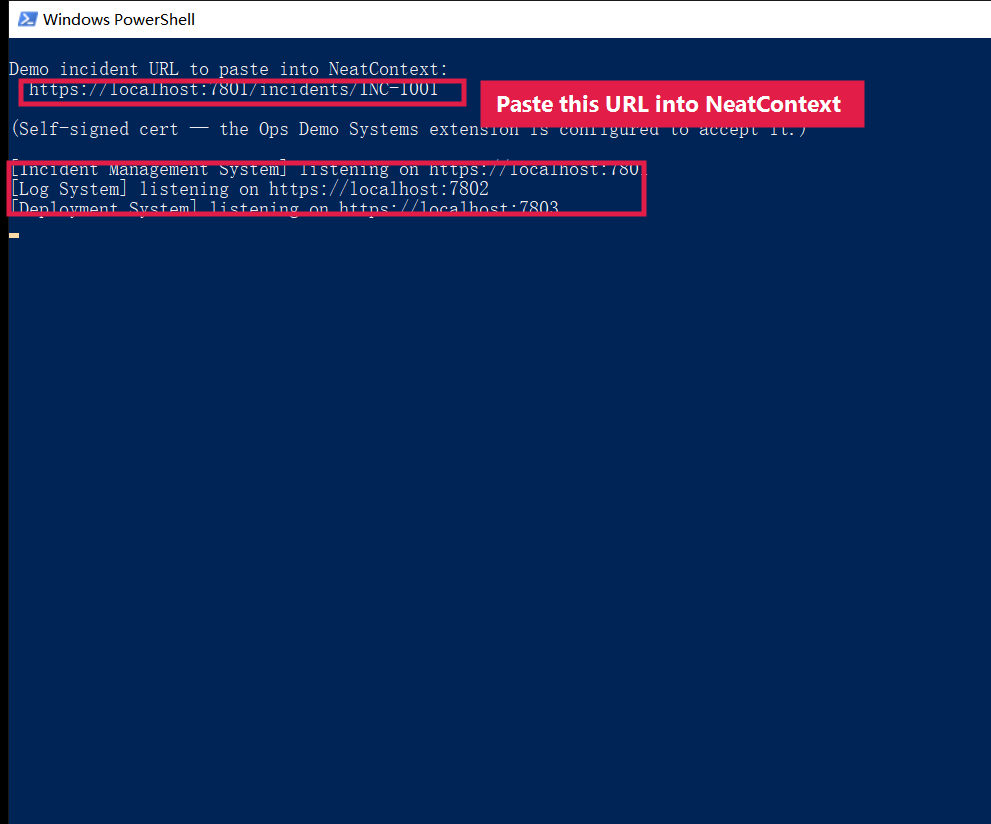
Leave this terminal running for the rest of the walkthrough. Optional sanity
check: open https://localhost:7801/incidents/INC-1001 in a browser (accept the
self-signed-cert warning) — you should get the incident JSON. The extension needs
no such acceptance; it is configured to trust the demo cert.
Override with env vars, e.g.
INCIDENT_PORT=8801 LOG_PORT=8802 DEPLOY_PORT=8803 node servers/index.js, then point
the extension at them with the matching NEATCONTEXT_DEMO_*_BASE variables (see the
demo README's Customizing section).
Step 3 — Add and enable the extension
- Open the Extensions page.
- Click Install from folder and select the demo's
extension/opsdemosystemsfolder (the one containingneatcontext-extension.json). NeatContext installs it as Ops Demo Systems. - Make sure it's enabled. There is nothing to authenticate — it talks straight to the local mock systems.
It exposes three read-only tools:
demo_get_incident— incident details + timelinedemo_search_logs— log lines for a service/time windowdemo_list_deployments— recent deploys (change, owning team, risk, rollback)
Step 4 — Link the demo's profiles and knowledge into your Library
Open Library:
- Under Domain profiles, Import both
profiles/payments-team.mdandprofiles/infra-team.md(linked in place from the clone). - Under Knowledge folders, Add folder for both
knowledge/payments-teamandknowledge/infra-team.
Step 5 — Build Team A's Context: Payments Engineering
On the Contexts page, rename the first Context tab to Payments and select:
- Domain profiles → Add from Library →
payments-team, and mark it active. - Knowledge folders → Add from Library →
knowledge/payments-team. - Extensions → enable Ops Demo Systems for this Context.
This Context now carries only the Payments profile, only its knowledge base, and the demo tools — so the AI will reason strictly from this team's context.
Step 6 — Connect your AI client and ask (Payments)
In Connect this context, click Connect on your client's card. NeatContext
opens a fresh session pinned to the Payments Context; approve the neatcontext
tools if prompted. Then ask, in that session:
Please use NeatContext mcp server to analyze incident https://localhost:7801/incidents/INC-1001.
What should we check first, and what's the safe action?
What you should see. The AI reads the Payments profile, calls the demo tools
(demo_get_incident, demo_search_logs, demo_list_deployments), searches the
Payments runbooks, and runs the profile's "is this ours?" triage:
- the 5xx started 09:02, before the 09:05 checkout-api deploy → our deploy isn't the trigger;
- the payment provider is healthy → not the provider;
- the dominant error is
could not obtain connection from pool 'billing-postgres'→ the binding constraint is the DB connection pool, which Infra owns.
➡️ Correct outcome for Payments: this is not our root cause — escalate / hand off to Infra Team, with the evidence. A good investigation can correctly end in a hand-off.
The answer ends with a Sources section citing the exact files it read —
checkout-api-5xx.md, service-ownership.md, and the hand-off postmortem — as
clickable links, plus the demo tools it called. Two levers are at work:
the answer is grounded in the Payments knowledge base, and the profile shapes
the response, applying the "is this ours?" triage and the "don't touch Infra's
surface — hand off" rule.
Step 7 — Build Team B's Context and ask the SAME incident
No swapping — give Infra its own Context and leave the Payments Context exactly as it is.
- On the Contexts page, click + for a new Context and name it Infra.
- Select
infra-teamas the active profile, addknowledge/infra-team, and enable Ops Demo Systems. - Connect your client to the Infra Context (a fresh, separate session), and ask the exact same question with the same incident URL as Step 6.
What you should see. Same tools, same data — but now the AI owns the root
cause. It zeroes in on the 08:58 pgbouncer default_pool_size 100 → 40 change,
confirms the Postgres primary is healthy (so it's the pool ceiling, not the
database), and gives the fix and next actions: revert default_pool_size to 100
and RELOAD pgbouncer (no dropped connections), verify the pool drains and the 5xx
clears, then monitor pool utilization. It warns not to fail over the primary —
straight from Infra's TSG.
Compare the two: same incident, hand-off in one Context, root-cause fix in the other.
Back in NeatContext, open each Context's activity log (View activity) to confirm which profile, folders, and tools were actually handed off and run.
What the demo proves
- Domain profiles steer reasoning toward the team's correct action. The only difference between the two Contexts is the profile + knowledge folder each carries. Same incident, same tools, same raw evidence — two right answers.
- Each Context keeps its own selection. Both investigations stay side by side; nothing was swapped in or out.
- The knowledge base grounds the answer. Each team's runbooks/TSGs/postmortems give the AI team-specific first-checks and dangerous-action rules it would not otherwise know — and the citations let you verify.
- The extension is a read-only connector. Point the same pattern at your real incident/log/deploy systems and it works beyond the demo.
Take it further
- Point the extension at real systems by setting the
NEATCONTEXT_DEMO_*_BASEenvironment variables to your own incident/log/deploy APIs. - Learn to build your own connector in
Building Extensions — the demo's
server.cjsis authored exactly like any third-party extension.